DeskLapse
1 November 2026 · Kevin Cappuccio · live doc on claude.ai · spun off from the 4K capture card thing
I wanted a time-lapse of my bench that just runs. All day, every day, no shutter sound, no remembering to hit record, and nothing that dies and takes the day with it when I close the laptop. The capture card from the other writeup was already pointed at the desk and doing 4K, so the obvious move was a tiny menu bar app that eats frames from it. It turned out to be about 600 lines of Swift and three problems that were harder than they looked, so here's all of that.
- A macOS menu bar app, one Swift file, no Xcode. Opens at login, grabs 4K frames from the capture card, writes them as video (or JPEGs) into a folder per day.
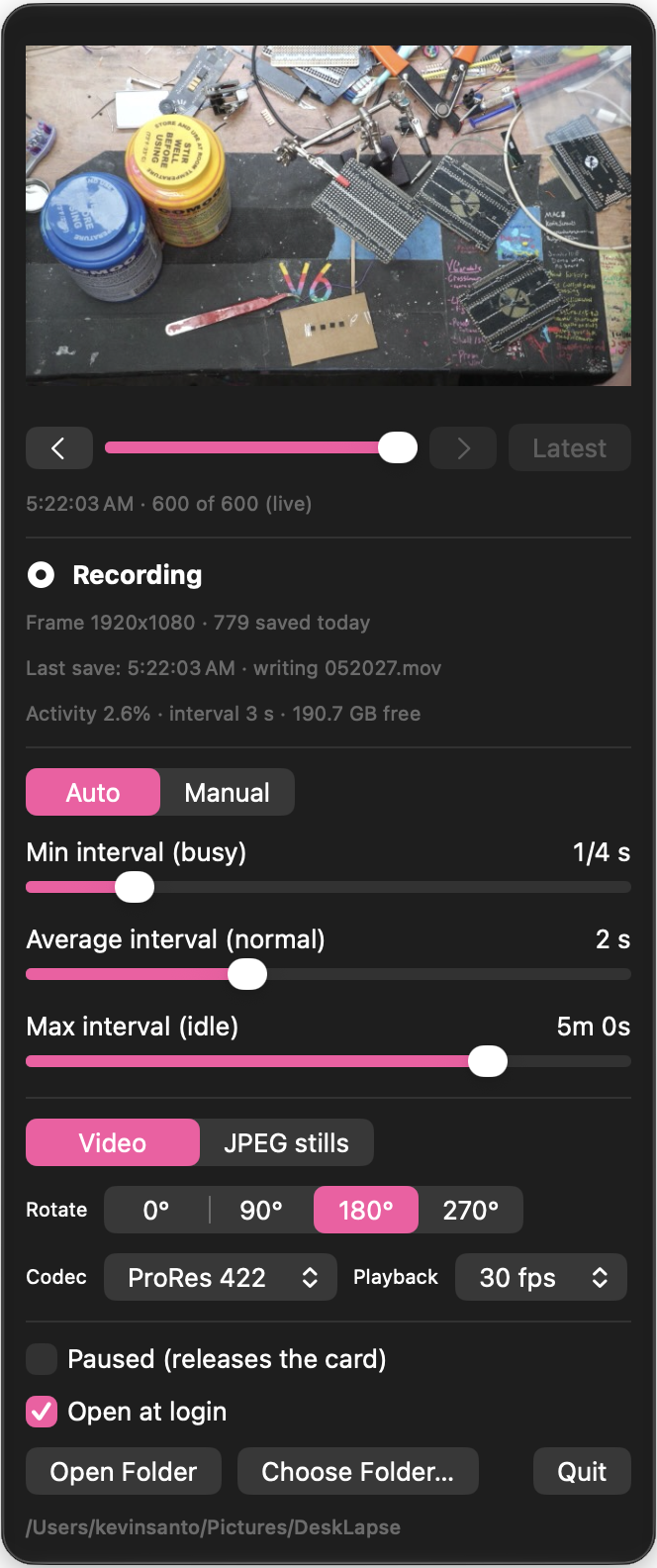
- The interval follows how much is moving on the bench. Three sliders: the shortest interval when it's busy, the longest when it's dead, and what "normal" should be. Or a fixed interval, anywhere from one frame an hour down to 24 a second.
- The video is crash-safe. Close the lid, kill the app, yank the plug: you lose one frame.
- It shares the card with OBS. When OBS launches, DeskLapse hands over the card and keeps recording on whatever mode OBS picked.
Here's the whole UI:
Why not just use OBS?
OBS has no interval capture, the macOS screenshot command plays a shutter sound every single time, and I wanted the thing to notice when I'm actually doing something versus when I've wandered off. The only way to do that last part is to look at the frames yourself, so it's its own AVFoundation session on the card. Which raised a question I didn't know the answer to: can two programs read the same USB camera on a Mac? Turns out yes, with a catch. Whoever opens it first gets to pick the format and everyone else rides along on that. So the app watches for OBS launching, lets go of the card, waits a few seconds, and reattaches without trying to change anything. When OBS quits it grabs the card back and sets it to 4K.
How the auto interval works
Every frame, it samples a 240×135 grid of luma values and counts how many moved by more than 12 levels since the previous frame. Not the average difference, which was my first attempt, because the A7S is a real sensor with real noise and the average difference never goes to zero. A "how many pixels changed a lot" fraction ignores noise and lights up for hands, tools, and parts being moved around. That fraction gets smoothed over five seconds and mapped onto the three sliders like so:
activity ≤ 0.3%   →  max interval   (nobody's here)
activity = 3%     →  average interval
activity ≥ 30%    →  min interval   (hands everywhere)
in between        →  log-log interpolation
So the "average" slider is literally the interval you get during normal desk work, and busy or dead stretches slide toward the other two. Those three thresholds are constants at the top of the file, and if your camera is further from the action than mine they're the first thing to tune.
The crash-safe video trick
JPEGs are trivially crash-safe, each file is its own thing, lose power and you lose the one being written. A video file is not. A normal MOV is unreadable until the writer finalizes it, so a crash at 4 pm loses the whole day. The fix is QuickTime movie fragments: tell AVAssetWriter to write a fragment after every frame and the file on disk is always playable up to the last fragment, with a repair step that turns the leftovers into a normal file next time the app launches.
Three things bit me on the way there, and all three are the kind of thing you only find out by killing the process and looking at what's on disk:
- The fragment interval is in movie time, not wall time. A time-lapse frame is 1/30 of a second of movie, so "a fragment every 10 seconds" meant a fragment every 300 captured frames, which at my intervals is about fifteen minutes of absolutely nothing on disk. One frame per fragment it is.
- HEVC with frame reordering holds frames back until it has seen the future. Turn reordering off and the encoder spits each frame out as it arrives.
- Even then the writer sits on the newest frame until the next one shows up, no matter how you feed it. So a hard crash loses exactly one frame. A normal quit or a shutdown loses nothing.
One more: fragmented movies are a thing Premiere handles badly, and it turns out finishWriting leaves the fragments in even on a clean close. So every segment gets losslessly remuxed into a flat MOV when it closes, and anything a crash left behind gets the same treatment on the next launch. Segments roll over every hour or 2 GB so that remux never needs much free disk.
Odds and ends
- The squeezed mode. If OBS has the card in its 1920×2160 mode, frames arrive at half width. The app stretches them back to 3840×2160 on the way out, so everything it saves is 16:9.
- Rotation. JPEGs get rotated pixels. Video gets a rotation matrix in the track header, same as an iPhone does, which Premiere and QuickTime honour and which costs nothing.
- Preview. The panel keeps the last 600 captures as thumbnails. It opens on the newest and you can scrub back through the day.
- Disk guard. It stops saving at 3 GB free instead of filling the boot drive. ProRes 422 at 4K is about 2.3 MB a frame, so at a 10 second cadence that's 20 GB a day. HEVC is a fraction of that.
- Open at login is one call to
SMAppService. The catch is code signing: an ad-hoc signed app gets a fresh identity every build, so macOS asks for camera permission every time you rebuild. Signing with a real Developer ID certificate makes it stick. - No Xcode. It builds with
swiftcfrom the command line tools. One gotcha:@Stateis a macro in the current SDK and the command line toolchain can't load it, so the UI state lives in the engine as@Publishedproperties instead. Slightly ugly, works fine.
Build it yourself
It's one Swift file plus a 15 line build script. Edit main.swift, run build.sh, and it compiles, bundles, signs, and relaunches. Tune the constants at the top for your camera and your bench. The source isn't on GitHub yet; ask me and I'll send it.
swiftc -O -swift-version 5 -parse-as-library -target arm64-apple-macos14.0 main.swift -o DeskLapse
codesign -s "Developer ID Application: …" --force DeskLapse.app
To turn a day of JPEGs into a movie: ffmpeg -framerate 30 -pattern_type glob -i '*.jpg' -c:v prores_videotoolbox out.mov. In video mode you don't need to do anything, the segments are already movies.
Spun off from the 4K capture card project, October 2026.